Hello Everyone,
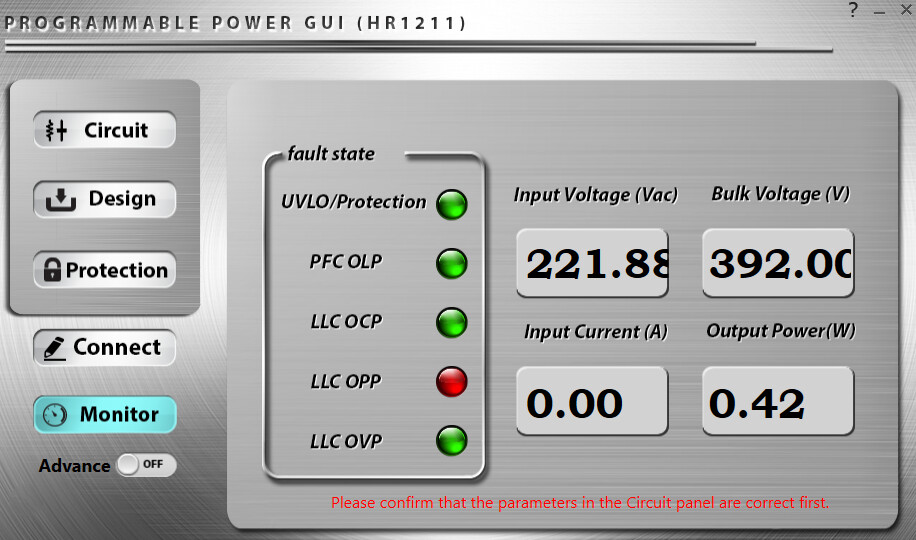
Good day! I am currently designing a 600W 40A Battery Charger using the HR1211 PFC+LLC controller. I’m still having difficulties in properly configuring the values in POWER GUI Tool. I tried to monitor my prototype through the GUI tool and I keep having a fault state of LLC OPP. I don’t understand well what causes it to fault, whatever the load condition this fault state is always appearing.
I can turn-on and even add a load until full load on my prototype, but I’m just concern about the fault state that the GUI can see. I’m hoping for an advice on how to troubleshoot this fault state in GUI, whether this a problem with my circuit or just the values I put on the GUI tool. Thank you so much in advance!
Hello again, it’s good to see that your prototype operates normally under full load conditions. This is a good sign for the hardware in the sense that you don’t see the HR1211 shutting down or hiccupping, which is a noted symptom of what OPP does in practice as specified in the datasheet:
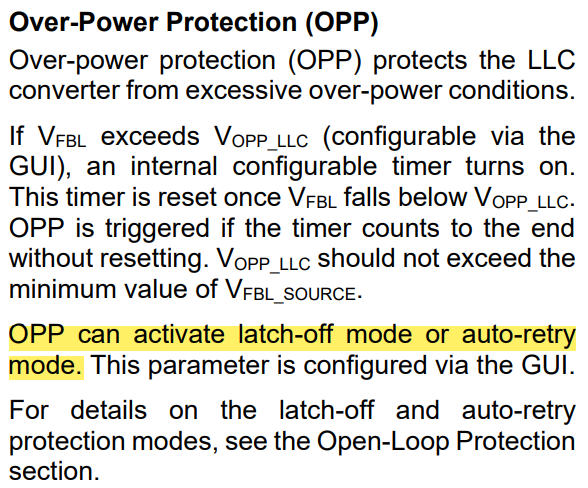
Because of this, the fault here is likely on the GUI interpretation/implementation. Here are some ideas to explore when troubleshooting the LLC OPP error here:
-
Clear the faults on the GUI and re-enable monitoring by checking if the LLC OPP immediately returns. Re-check this only after the load is applied of course.
-
Check if you have the latest version of the GUI. What is the version you have here?
-
Check the CSHB resistor value and evaluate the current sense gain. If this gain is too high, the LLC OPP may be triggered falsely.
-
The OPP calculation is dependent on the sensed current voltage at the CS pin. If this threshold is too low for example, then OPP can be easily triggered, especially at full load.
I would recommend checking steps 3 and 4 if clearing the faults in step 1 doesn’t just work out or if you have the latest version of the GUI as outlined in step 2. Let me know if this issue continues.
Best,
Krishan
1 Like
Hi Mr. Krishan,
Thank you so much for your response and advice. May I know first how to clear the faults in GUI? Do you mean disconnect the GUI first (when disconnected all is green except UVLO fault) then connect it again while the prototype is on at full-load? Or just turn-off my unit then turn-on again and see if the fault persists on monitoring tab in GUI?
For the latest version, I just updated it now to v1.10.
Thank you again.
Regards,
Mark
Hello again,
Apologies for the delayed response here. To clear all faults, there should be a clickable button on the GUI itself that clears all faults.
This topic was automatically closed after 11 days. New replies are no longer allowed.